vizz

Realtime generative visuals for VJing. Native Rust and wgpu, feeding Resolume, TouchDesigner and MadMapper over Syphon and NDI, played live over OSC and MIDI.

Apple Silicon and Intel. signed & notarized — it opens with a normal double-click, checked with spctl in CI before every release. Windows builds from source and is tested in CI; there is no Windows installer yet.

Install

Or one line in a terminal, which puts it in Applications:

curl -fsSL https://raw.githubusercontent.com/legofsalmon/vizz/main/scripts/install.sh | bash

Syphon is embedded in the bundle — nothing else to install. Double-clicking runs 1280×720 with OSC on udp/7000 and Syphon on.

What it does

Built to survive a live set: the render thread never waits on anything.

Out to your VJ software

Syphon on macOS, zero-copy on the same Metal queue. NDI on the network, with frames dropped rather than awaited — losing an NDI frame is survivable, missing vsync is not.

Played, not configured

OSC and MIDI on every parameter. Sixteen assignable faders on the performance layout, each with MIDI learn and a ghost mark showing where modulation has actually pushed it.

Looks become scenes

Design a look, save it as a preset, put it on one of sixteen pads, and fire it mid-set — the blend takes musical time and moves the parameters, not a crossfade. Edit a preset once and every pad playing it follows.

A gravity layer above them

Four attractors and repulsors bend the cloud from a layer over the scenes, with their own presets and their own sixteen-pad grid. Looks and wells compose instead of overwriting each other.

Modulation as a node graph

LFOs, a beat clock, and four configurable audio bands with tempo detection, wired on a pannable canvas. Modulation is an offset on top of your value, so a fader you set stays where you set it.

Geometry

Eight morphing modes including two strange attractors. Drop a PLY, XYZ, PTS or CSV onto the window to load a scan, colour included. A real camera with depth of field, and a wireframe room sized to the frame for forced perspective.

Live point clouds

Stream PLY in over TCP, or watch a file that gets rewritten. Frames morph against loaded scans and attractors like any other cloud. No wrapper protocol — a PLY header is its own frame length.

Honest about failure

Every external dependency fails soft. Health monitoring with frame-time percentiles, and a headless mode that renders the same frame path as a live set for benchmarking.
The presets it ships with

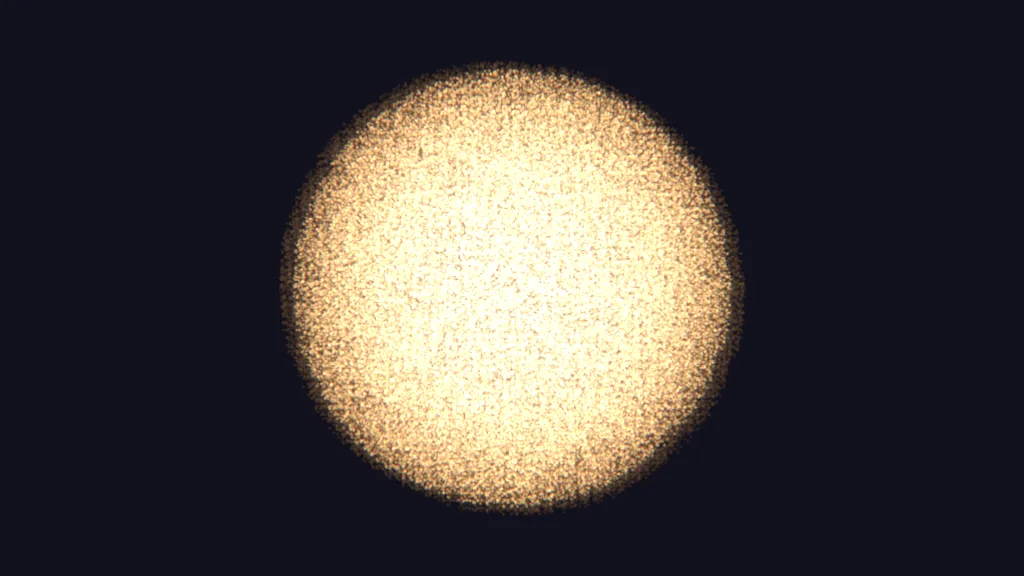
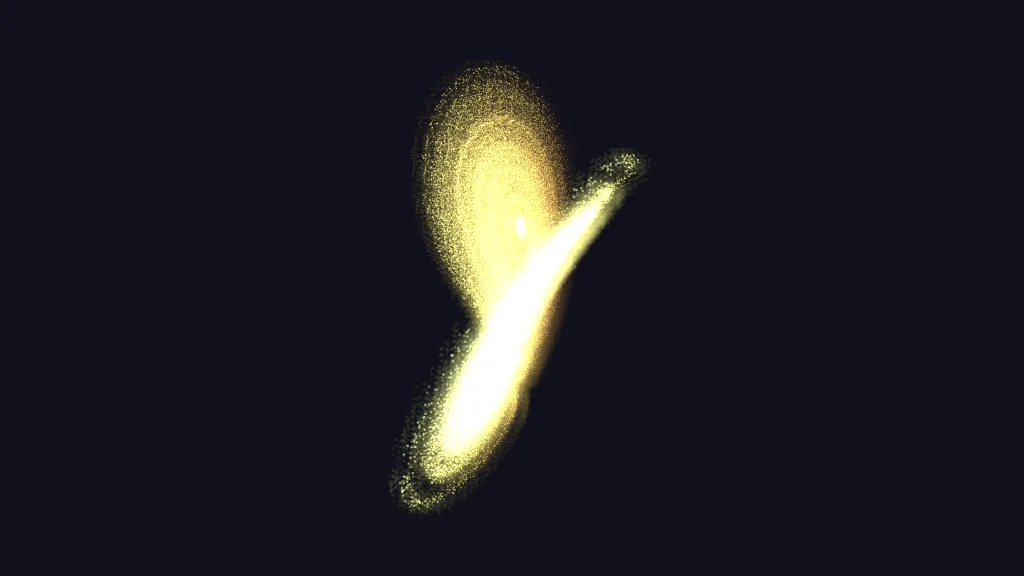
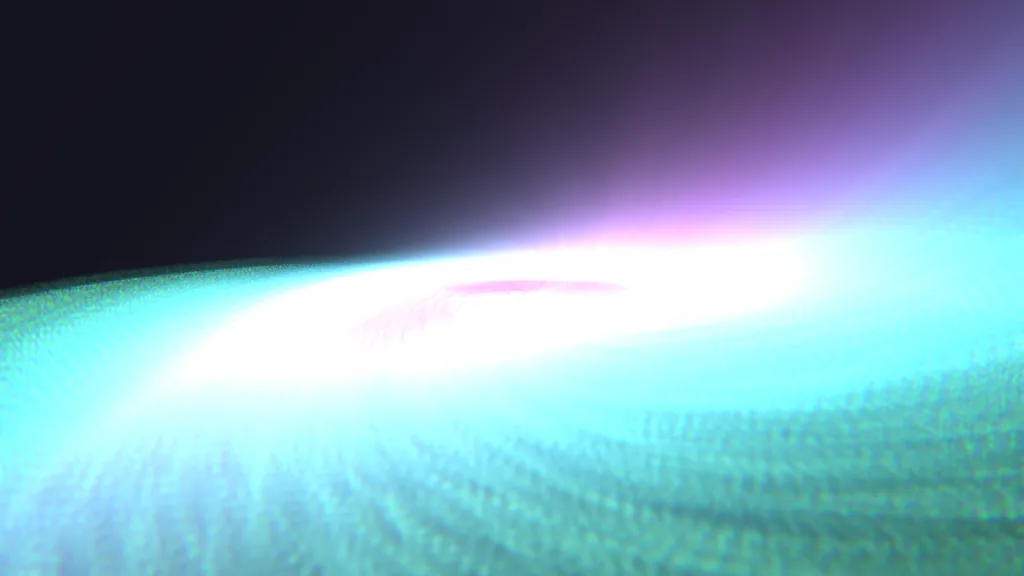
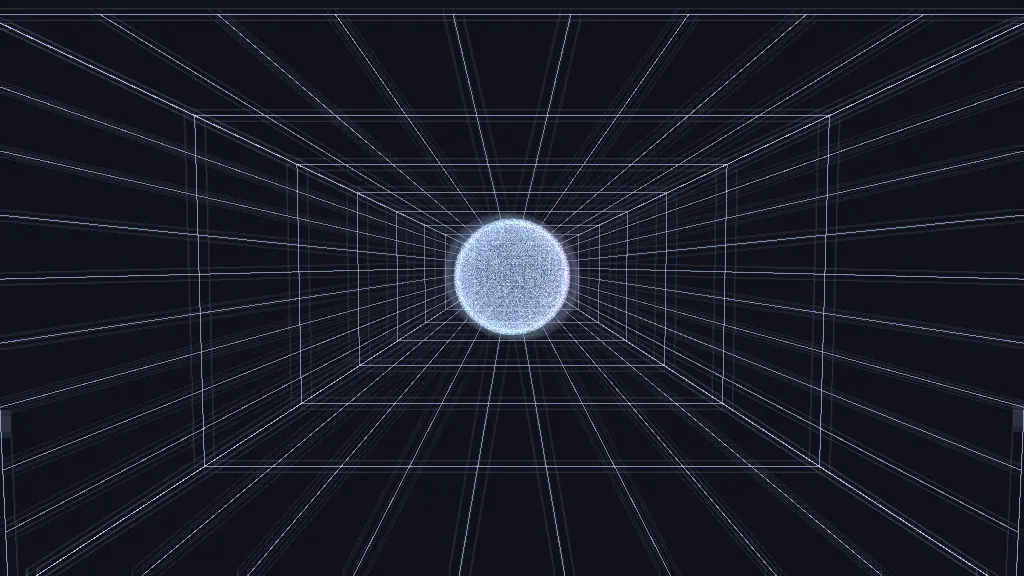
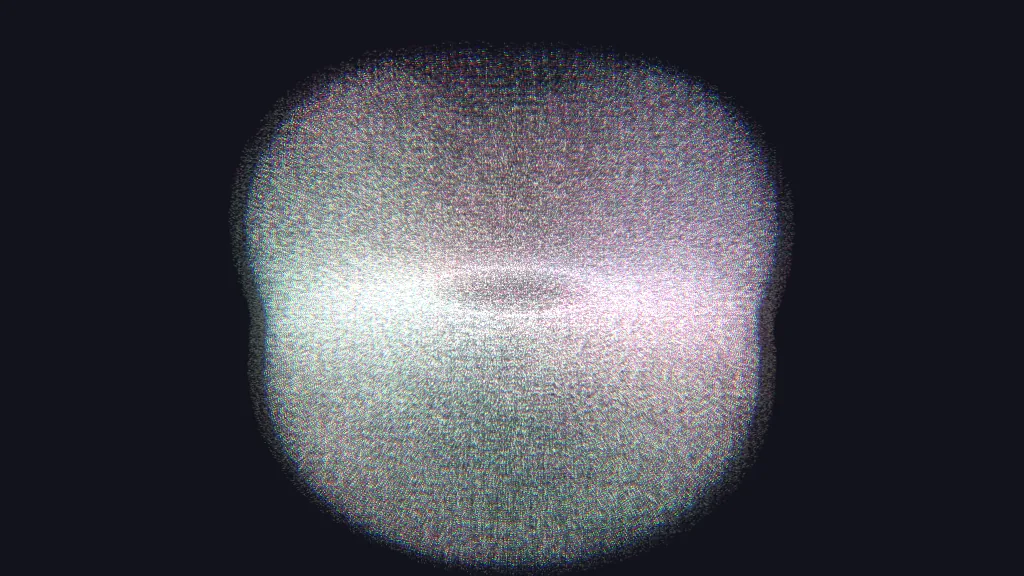
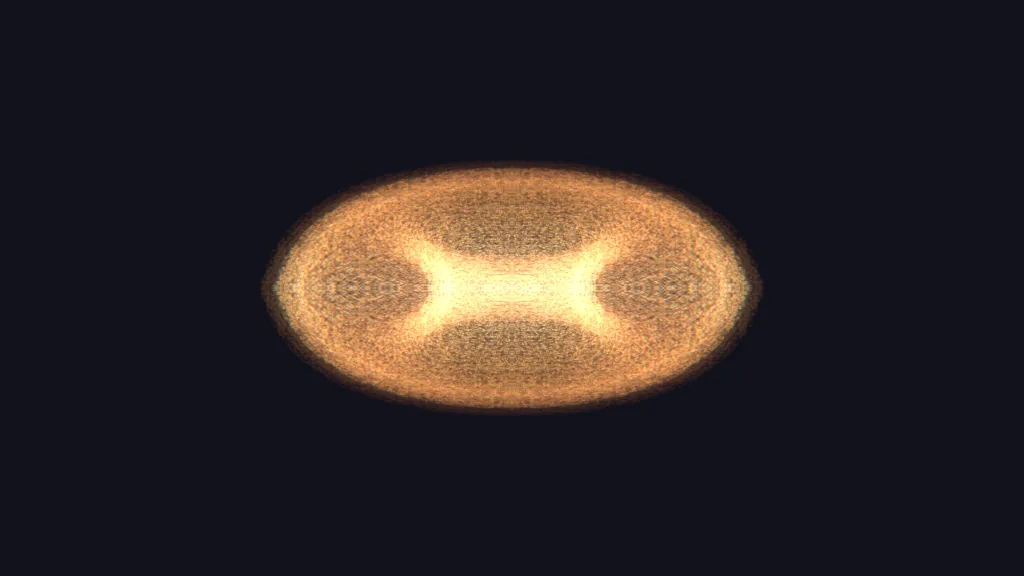
Six built in, on the number keys. Every one of these is a real frame, rendered headlessly from the preset itself.

A wide, warm sphere of particles
1 · Slow bloom
The Lorenz attractor drawn in particles
2 · Butterfly
A grid plane driven into a feedback vortex
3 · Tunnel
A particle sphere inside a wireframe room in forced perspective
4 · Stage
Dense multicoloured particle speckle
5 · Confetti
A mirrored torus sheared into ribbons
6 · Ribbon

Changelog

Newest first. Full notes on each release page.

  • A modulator belongs to the parameter it drives. The row's control used to be a button labelled “LFO 1” that routed the first LFO in the rack at a fixed depth — so everything you modulated got the same LFO, and shaping it meant leaving the row to go and find it. Press ~ and the parameter gets a modulator of its own, opened underneath: source, shape, cycle length in beats, depth. Pointing several parameters at one shared LFO is still there, one step further in — where it belongs, since sharing is the special case.
  • Modulators can be given an in and an out point. Depth swings a parameter either side of wherever the fader is. An explicit range says where the value actually goes — set in the parameter's own units, not as a fraction of anything. The trade is that the fader stops moving that parameter, and the row says so rather than leaving you to wonder.
  • The parameter list is a third of the length. Two thirds of it was repeated structure: four identical copies of the sixteen vector-layer parameters, four gravity wells, two lamps, four inks. Those are now instances that open when something in them is off its default, so what you are not using costs one row instead of sixteen — 66 rows on opening instead of 176, with nothing removed. There is also a changed filter, for the question the name filter cannot answer.
  • The lighting controls were unfindable. 0.23.0 shipped them into a section headed MORE with a note meant for whoever was editing the panel. They are under STAGE, where they belong.
  • A live point-cloud stream ran at about twelve frames a second. 0.23.0 added normal fitting to the single path a cloud takes to the GPU — and a stream goes through that path once per arriving frame, so every frame fitted normals to sixty-five thousand points. That was 180 ms a frame; it is now under three. Three further faults found in the same area are fixed with it, including normals coming out wrong on any cloud smaller than a slot, which is most of them.
  • Light, for point clouds. Nothing in the renderer knew where a light was: a point's colour was its palette entry times the scan's own colour times a distance fade. Now there are two movable lamps — position, reach, level and colour — that fall off with distance and work on anything with a position, so you can walk one through a scan and have it reveal the scan. Alongside them a directional sun that lights surfaces: the wall facing it comes up, the wall facing away goes down. Torch puts a lamp on the camera. All of it is off by default, and off means the picture is exactly what it was — every preset you have saved renders identically.
  • Normals: read, estimated, or absent — never invented. A point cloud is points; whether it also knows which way its surface faces is up to whoever exported it, and most exports leave the field empty. vizz reads them from a PLY that has them and works them out from each point's neighbours when it does not, in about a tenth of a second as a cloud loads. A cloud with no surface at all — a procedural shape, a video frame — is left alone and the sun simply does nothing to it, rather than lighting it from a direction nobody measured.
  • Ten camera moves. Orbit, sway, push, pull, crane, spiral, look around, fly through, walkthrough — four legs and four corners at eye level, inside the cloud — and a slow drift for long ambient sections. Rate is in bars, so a move locks to the same clock as the sequencer. Every one is added to the camera your faders already describe rather than written back into it, so switching a move off puts you exactly where you were and a move running is never a reason you cannot still steer.
  • A big scan now shows all of itself. Loading a cloud kept the first sixty-five thousand points rather than a sample across the whole thing — and scanners write in scan order, so a five-million-point room was showing one corner of itself. It now strides the whole cloud. If you have a look built on a large scan it will render more of that scan than it used to.
  • Shows: one project per set, switched from the top of the app. Everything the app remembered sat in one flat directory, so a machine held exactly one show — fine for an instrument you set up once, wrong for one that goes to two gigs a week. A show is now a folder of its own holding both grids, the pages of pads, your looks, your patches, your fader layout and your slider ranges, and the name at the start of the panel and of the performance strip is which one is open. Its menu is the list, plus new show, save as, rename and delete. Your output size, audio device and controller map stay where they are: they describe the rig in front of you, not the set you are playing. There is still no save button, because everything is still written the moment it changes — “save as” means copy this show and carry on in the copy. Upgrading moves what you already have into Show 1, nothing copied and nothing left behind.
  • A full preset library no longer takes the row with it. The preset row drew one button per preset and was written when a library was a handful. The built-in set makes it a hundred and sixty, and the block ran past what the column could draw — so it vanished entirely rather than overflowing visibly, which is the confusing way round. It is bounded now and scrolls, so every preset stays reachable.
  • The built-in set could not actually be loaded. On a machine that already has a show the set does not install itself, so right-clicking the + beside the deck chips was the only route to it — and that route did not work. The confirm is an armed button, and clicking to arm it closed the menu it lived in, taking the second click's target with it. Deleting a page was broken the same way. Both now work, both driven by real clicks in a test.
  • Decks: the pads as pages, one per song. Sixteen scenes was a generous evening for one continuous set and nowhere near enough for twelve songs that each want their own looks. A deck is a page of both grids together, switched live. Looks stay in one pool, so the same one can sit on a pad in every song and refining it improves all twelve. Turning a page fires nothing and moves no parameter: whatever is on screen stays until you press a pad, because every page turn happens in front of an audience.
  • vizz follows Resolume. With OSC Output on in Arena, launching a column fires the scene pad and the gravity pad of that number together, and choosing a deck picks the song here. A deck is the song, a column is the section — so one launch moves the video, the lights and the field to the same place. Off unless you ask for it: the listener binds every interface, and following hands anyone on venue wifi the scene transport.
  • A show in the box. A machine that has never had one set up opens on twenty songs of eight sections — Intro, Build, Break, Drop, Bridge, Peak, Outro, Blackout, the same eight a lighting rig uses. Hard-edged flat geometry on black paper, layers at close frequencies interfering into moiré. Every pad is an ordinary preset, so any of them is one store away from being yours.
  • A pattern's own movement is now a control. Vector layers drifted on their own, from a constant buried in the renderer — real, deliberate, and invisible to everything: no parameter held it, nothing could show it, and the only way to still a layer was to stop the whole particle field. It is /lN/drift now, so it takes a fader, learns a MIDI control, can be modulated, runs backwards, and zero is genuinely still. Existing looks are unchanged.
  • The panel's ~ means "this is moving". It used to mean "has a modulation route", which is a different question from the one you ask: a scene blend in flight or a preset still arriving moved the picture and lit nothing. When something moves with nothing routed to it, the hover says so.
  • Assigning a fader looks like a gesture. The name and the "assign" placeholder are buttons now; the picker opens under the fader that opened it, and has a filter box focused on arrival — type a few letters and press Enter.
  • Resync and lock for the two sequencers. Put the scene and gravity grids back on their first pad on the same step, and optionally keep them on the same rate and curve so they cannot drift apart again.
  • Loaded pads on a controller are brighter. They were lit one step above off, which on real hardware reads as dim orange rather than the neutral grey the palette table claims. The three colours can also be set at launch with VIZZ_PAD_COLOURS.
  • Update checking stopped costing frames. With an update available, vizz was running a signature check sixty times a second on the render thread to re-answer a question whose answer cannot change.
  • The faders no longer disappear on a short window. At some window sizes the whole fader block — all sixteen and the master with them — was laid out below the bottom edge and thrown away, so the CONTROLS heading sat over nothing and the dim fader that recovers a black output was simply gone. When there is genuinely no room the sections above stand down instead: the faders are what you play, and they should be the last thing to give way rather than the first.
  • The master fader keeps its name. Its caption overhung its column at every size, invisibly, until the window was narrow enough to push it off the screen entirely — leaving the master looking like a nameless fader on the end of the row.
  • The vector layers can be found and started from the performance screen. The strip used to be invisible until a layer was already running, and nothing on that screen could start one — the only way in was the parameter list on the other screen. Now there is one line when nothing is on, and right-clicking a layer's generator or blend mode lists every choice instead of cycling backwards through them.
  • A stuck pointer is caught and corrected. If the interface ever missed a mouse release it went on believing the button was held, and the next move carried on dragging. Releases are now synthesised where they provably cannot arrive, and a genuinely stuck pointer says so in the log.
  • vizz updates itself. Download and install from the banner, without leaving the app — your patches, presets, palettes and mappings all live outside the bundle and are untouched. Every step is one you press: the check happens on its own, nothing else does, and the install refuses while a recording is running. Nothing is replaced while it is running either — the swap waits for vizz to quit, and puts the old copy back if it fails. A download has to be signed by the same Developer ID as the copy you are running, or it is refused.
  • Ready-made modulators, one click from a fader. Fourteen of them — sweeps, beat and bar pulses, rise, fall, steps, kick, snare, highs, loudness, wobble, random step, flicker. Click a fader's value to pick one. Each brings its own source, so two faders never fight over one oscillator, and what it builds stays on the modulation canvas to read and edit.
  • The APC40 mkII arrives mapped. Gravity on the top two rows of the clip grid, scenes on the bottom two, the middle row left clear as a landmark for the hand. The eight track faders take the eight parameters on the performance layout's first row; the master fader takes master dim. Nothing you have already mapped is overwritten.
  • And it lights up. vizz now sends MIDI out: a pad holding a preset glows, the one playing goes green, and the one the sequencer will fire next goes amber.
  • A zero blend time is a cut. It used to still animate — the grid finished instantly but each parameter's own smoothing kept easing — which made the one setting you reach for when you want a hard cut on a beat appear to do nothing.
  • Blank scenes. Right-click any pad to store a blank: every parameter that layer owns at the bottom of its range. An ending, or a hole to punch back out of.
  • Faster frames. Two per-frame system calls removed from the panel — one enumerated every mounted volume, the other re-read every saved preset from disk. The health log now also splits out how long the interface took, so a slow frame says which half to look at.
  • The faders, rebuilt. Each one is now a dark well milled into the deck, a column of light in it, and a near-white waterline at the surface of that light which is the value. A hole rather than a raised block, because when the output flashes white behind the interface a raised track closes on the lifting ground and vanishes at exactly the moment the screen matters — a hole opens away from it. Reference marks are engraved inside the well in two tones so they read against both the light and the dark.
  • They move properly too. A value that arrives from a controller or a preset glides to where it is; under your own hand there is none of that, because a fader that lags the hand on it is a fader you fight. Press far from the value to jump to it, near it to nudge from where it is, and hold Shift for a quarter-speed fine drag.
  • A mapped fader is a different shape, not a different word: a rail down the side, so a mapped deck and an unmapped one are different pictures from across a room.
  • Choose how many faders you want — four to twenty-four, saved with the rest of your set.
  • The performance view shows the performance. It used to be six sections stacked full-width over an opaque scrim, so the one thing the screen could not show you was the picture you were mixing. Now the controls take a column, the output takes the rest, and the pads and faders share a full-width deck along the bottom. Press V to stand the controls aside entirely and watch the output.
  • The preview is the real frame. The output is drawn into its pane and letterboxed to the master's aspect, rather than being glimpsed through a hole in the interface — which showed whichever part of the render happened to sit behind the gap.
  • Presets group by what they were built on — your scan, your typed words, the live stream — recorded when the look is saved. Existing presets keep working and group under “other” until re-saved.
  • A panel you can scan. Ten sections became three clusters; parameter names lead their rows in a proper column; and the narrow, route and learn buttons appear on hover instead of sitting on all 157 rows at once.
  • Scene and gravity pads are told apart by colour, each grid's controls fit one grouped row, and a loaded cloud can be put on screen by clicking it.
  • No change to the app itself — same build as 0.15.2. Releases are now built against the committed lockfile rather than whatever resolves on the day, so a signed download contains the dependency versions that were actually reviewed, and a version bump that forgets the lockfile stops the release instead of slipping past it.
  • Syphon output is the right way up. Metal renders with the origin at the top left and Syphon's convention is OpenGL's, origin at the bottom, so published frames needed a flip flag that defaulted to off — every receiver showed vizz upside down, and the only remedy was a command-line flag nobody double-clicking the app can reach.
  • Live point clouds hold still. A streamed cloud was re-measured and re-fitted every frame, so one stray LiDAR return at the back of the room rescaled everything and a subject leaning slid everything — steady geometry arriving visibly swimming. Streams now use an outlier-resistant fit that eases rather than snapping.
  • Streaming waits for the sender by default, which is the direction apps like LOTA actually work: they push to a receiver address rather than serving. The app also asks for local network access, which macOS 15 gates and which fails silently without it.
  • Receive a live point cloud from LOTA. vizz read only concatenated PLY files — a header declaring the vertex count, then the body. Apps that stream point clouds often send no header at all, just a count and then fixed-size points, so there was nothing to parse and the stream was refused. Both wire formats are now read, and which one is on the socket is worked out from the bytes rather than chosen from a menu.
  • A stream can be started from the panel. Receiving used to be a launch flag: set before startup, by someone who knew it existed, silent afterwards. The clouds section now takes an address, and once running shows whether a sender is attached and how many points are arriving — the number that tells a quiet socket from a working one mid-set.
  • Recording that cannot quietly eat the disk. A take used to be lossless PNG of every rendered frame at full size — about 800 MB a second at 1080p60, with nothing said before or during. Now the panel shows the rate, the free space and how long that gives you before you start; the take stops itself at a disk floor or an optional duration, keeping everything written. New settings: a record frame rate independent of the render rate, JPEG at quality 92 by default (roughly a tenth of PNG, with lossless one click away), and a countdown so a take does not open on the hand that started it.
  • Camera input actually works. A bundled app needs both a usage description and a hardened-runtime entitlement to open a capture device, and 0.14.0 shipped neither — AVFoundation refused with “add new input: Rejected”, an error that names the input rather than the permission.
  • Loaded clouds have a way in. Click a cloud in the list to put it on screen, or its “b” button to make it the far end of the morph. The mechanism was three parameters apart and only ever set by the drop itself.
  • Live input you can find. A video in section in the panel, beside audio: it lists every NDI sender on the network, every Syphon server on the Mac and every camera or capture card, and connects to one with a click. Syphon input and camera capture are new; NDI receive existed but only as a command-line flag, which is a feature nobody finds. The built-in test pattern sits at the top of the list, because it is the thing to reach for when nothing appears.
  • The panel reads as what it does. The parameter list was generated from OSC addresses, so it showed the network namespace — pal, vec and four peers called l1l4. It is now organised into SHAPE, LOOK, PRINT, STAGE and OUTPUT, in the order a look gets built, with a caption on every group saying what it is for.
  • The gravity sequencer had no way in. Its row only appeared once a pad was filled — but the row held the only button that could fill it, so on a fresh install the layer was unreachable from every screen. The empty state now offers a one-click capture.
  • Downloads carry their version. Releases are now vizz-0.14.0.app.zip, so a Downloads folder holding several of them can be told apart without unzipping each one.
  • Vector layers. The print side of the app: four layers of hard-edged procedural pattern — rings, stripes, checker, polygon, star, rays, dots — in flat ink colours from a shared four-slot palette, composited with multiply/screen/difference blends. Two layers at near frequencies interfere into moiré, which is the whole point. Edges are analytically antialiased, so they stay razor-sharp at any resolution, and blending happens in encoded space the way print does. Three looks ship on the preset row: Interference, Poster and Signal.
  • Play them like everything else. The layers are ordinary parameters, so OSC, MIDI learn, presets, scene morphing and the modulation canvas all work on them unwired. A dedicated LAYERS strip on the performance layout cycles generator and blend mode without leaving the screen, and the shipped Pulse patch makes a layer breathe on the kick out of the box. /vec/place switches the stack between living inside the feedback chain and printing clean over the top.
  • An interaction review of the whole instrument. Nineteen fixes against Nielsen's heuristics. Every destructive click now arms before it fires — including the canvas new button, which used to erase a patch on one press with no undo. Latched punch buttons look different from held ones, the recalled preset is marked on both screens, right-click reset finally works on the performance faders as the overlay always promised, and the shortcuts list learned the mouse gestures nobody could discover.
  • One design language. Colour, type, spacing, radii, motion timings and the shared widgets moved into a vizz-design crate — one meaning, one colour, everywhere, enforced by a test that fails if a screen restates a state colour by hand.
  • Live video as a point cloud. An incoming NDI feed becomes particles: each pixel a point, with the z axis offset by luminance or colour so a face turns into relief you can orbit, morph against any other cloud, and drive with everything else. /video/depth sets how far the relief pushes and /video/relief chooses what drives it.
  • A test pattern that needs no network. The built-in source proves the whole video path with no NDI runtime and no sender on the wire — which is also what lets CI run the video shader on real Metal hardware and check the pixels, not just the exit code.
  • A documentation site. Every OSC address, held to the parameter registry by a test, so the reference cannot drift from the app.
  • Punch FX. The things you do on the drop: flash, blackout, invert and a real frame-freeze, plus a beat-synced strobe with its own division. Hold-buttons on the performance layout (shift-click latches), Space is the flash key, and MIDI bindings are momentary for free. Gestures live outside presets — no recall can leave the output inverted.
  • Rhythm tools. Three new graph nodes — Beat trigger, Gate with hysteresis, and a retriggerable Envelope — so "kick in, size punches out" is three nodes and two wires. The beat clock can follow MIDI clock from a DJ mixer, with a tempo estimator that shrugs off USB jitter; tap and auto always win back control.
  • Words and pictures as clouds. Type a word and the particles form it, morphable like any shape and still there after a restart. Drop a PNG or JPEG for a coloured relief that keeps a logo's silhouette. The cloud bank grows to eight slots so files, words, images and the live stream stop evicting each other.
  • Fullscreen and a recorder. F11 fills the monitor the window is on, Esc steps back out, and --fullscreen starts venues that way. New /record/active captures the master as a PNG sequence that never stalls the show — drops are counted on the red REC chip, and a full disk stops the take with one notice.
  • Recall always wins. A preset recalled during a scene transition is no longer silently overwritten by the blend, and pressing its number again snaps back after hand-tweaking. The autopilot walks past a pad whose preset was deleted instead of wedging on it every bar.
  • The canvas tells the truth. A Param node aimed at nothing says missing; a wire refused for making a loop says why; save and load failures read red, not green. The canvas also remembers its pan, zoom and patch name across launches.
  • State files survive a second instance. Atomic writes no longer share temp names between processes, the MIDI map follows XDG_CONFIG_HOME like everything else, re-dropping an edited palette reloads it in place, and quitting flushes the newest MIDI binding.
  • Fullscreen earns its pixels. At 1080p the faders grow to thumb size and fill the window; duplicate labels disambiguate ("color spread" vs "particles spread"); a live-set's worth of copy now tells one story per control.
  • The OSC reference is complete and enforced. Every one of the 76 addresses, with ranges checked against the running registry by a test — plus honest --width precedence, a title bar that only claims what bound, and quit without the two-second stall.
  • The gravity layer. Four attractors and repulsors that bend the cloud, sitting over the scenes with their own presets and their own sixteen-pad grid — a look firing cannot disturb the wells, and a well cannot disturb the look.
  • Drop files onto the window. Point clouds as PLY, XYZ, PTS or CSV; your own colour palettes as GIMP .gpl or a list of hex colours. Both come back on the next launch.
  • Output size and render size are separate, with a 16-bit float master behind a toggle. Render above 1× for free anti-aliasing, below it for frame rate on a struggling machine.
  • A MIDI button can fire one pad. A binding can carry a slot, so sixteen buttons address sixteen scenes instead of all firing the last one. Existing midi.json files load unchanged.
  • Fixed: the field collapsed at high counts. A float hash ran out of precision above ~50k particles, so bigger counts drew repeats on top of each other. The count slider buys density all the way up now — every preset's look shifts slightly.
  • Escape asks before it quits, saving over a preset says so first, and a pre-1.0 review's worth of smaller fixes — full notes on the release.
  • Scenes name presets. A pad references a saved look rather than owning a copy of it, which is what makes the workflow work: prepare any number of looks at a desk, load sixteen into the grid at performance time.
  • The performance layout, rebuilt. Sixteen faders with MIDI learn and modulation marks, the grid and transport beside them, and text contrast chosen for a dark room rather than a desk.
  • Background colour, down to fully transparent — vizz as a layer in someone else's mix rather than the whole picture.
  • An audio input picker, camera panning with a reset to centre, and the control panel cut back to its one job: building a look.
  • The scene grid. Sixteen pads, and moving between two of them takes musical time rather than a frame. The blend is in the parameters and the point-cloud geometry, not a dissolve between two renders — one field moving, not two at half opacity. Beat-synced autopilot walks the filled pads on its own.
  • Audio sensitivity in decibels, and much higher by default — the top band barely moved before. fit sets every band from what is actually arriving.
  • An app icon, rendered by vizz itself.
  • Fixed: the Syphon output was a white box. The frame was published as sRGB, so the receiver read it a second time. It now goes out through a linear view of the same texture.
  • Fixed: mod would not turn off. Each press added another route on top of the last, so the modulation only ever got deeper. It is a toggle now.
  • Slider ranges can be narrowed. Zoom a parameter in to the part of its range you are actually performing in.
  • The frame rate readout no longer nudges the status line when it crosses 100.
  • Live point clouds. Stream PLY over TCP, listen for a sender, or watch a file rewritten in place.
  • NDI video input. Discovery, connection and capture. Not drawn to screen yet.
  • Windows built and tested in CI, on all three platforms now.
  • The ? shortcut list now opens with the panel hidden and from the performance layout — the two places you would ask for it.
  • Fixed: the picture saturated to white within seconds. With the room off — the default — the frame was never cleared. Present in 0.3.0 and 0.4.0.
  • Presets. Six built in, your own saved alongside, any of the first ten on a number key, OSC or a MIDI button.
  • Control panel rework. Status collapsed to one line, parameters grouped and filterable with /, modulated ones marked, stepped ones named rather than numbered.
  • Presets on the performance layout; fit on the node canvas.
  • First signed and notarized release — no more right-click → Open.
  • Steerable room perspective. Depth, convergence and a vanishing point that moves, with the opening staying locked to the frame edge.
  • The point cloud can sit inside the room and take its forced perspective.
  • Point clouds. PLY and XYZ import with colour, and morphing between two clouds.
  • A real camera with orbit, field of view and depth of field, and the wireframe room.
  • Patch storage, the node palette, and the performance layout.
  • The node canvas for modulation, and the release preflight.
  • First release: the particle field, Syphon and NDI output, OSC.